- DATE:
- AUTHOR:
- The Araya team

Property Intelligence enhancements for Araya Administrators
Tailor the Property Intelligence experience with Geographic and Feature Access Controls
Araya Property Intelligence now supports comprehensive Feature Access and Geographic Access Controls, giving Administrators the power to tailor available features and geographic data access for all users at the state and county level.
The Benefit: Better control of costs and compliance.
Limiting access to certain features and geographies allows you to manage credit usage, eliminate unexpected costs, and keep users aligned with internal and external policy guidelines.
New Araya Admin Settings
Within the Admin Center/Product Restrictions, Araya Admins can choose which features and geographies their users can access.
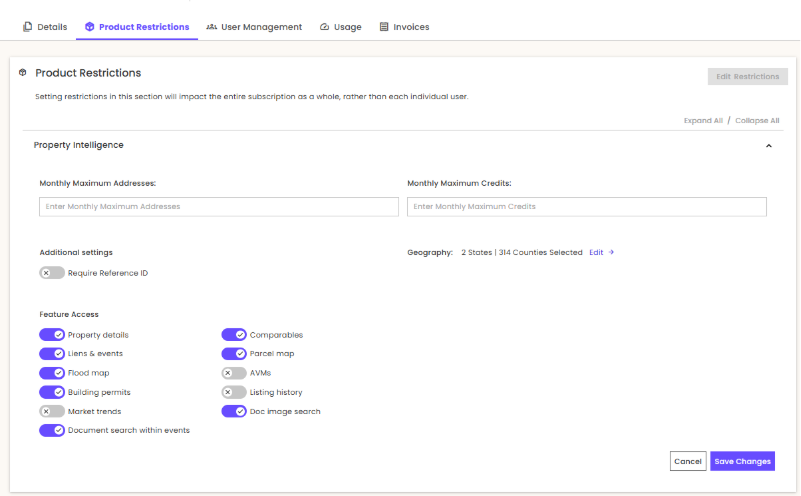
Geography access can be limited to specific states and counties.
Feature access options include:
Property details
Comparables
Liens & Events
Document search within Liens
Parcel map
Flood map
AVMs
Building permits
Listing history
Market trends
Doc image search
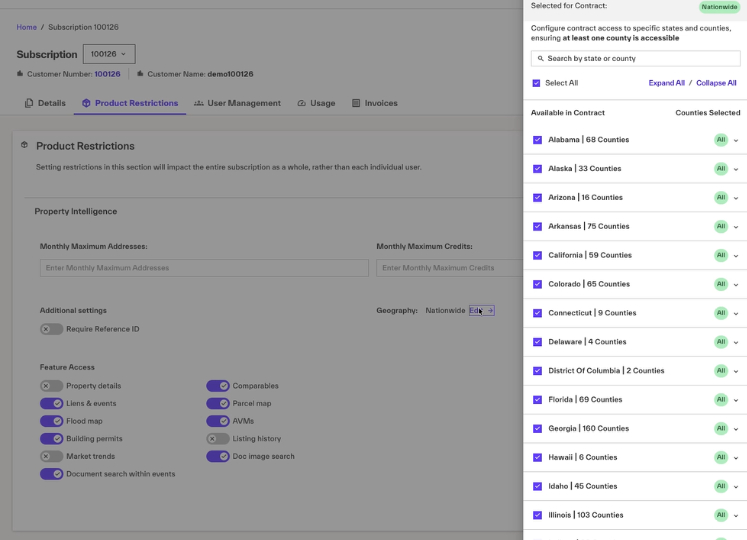
Geography access limits in Property Intelligence
When geography limits are in place, users will only be able to see the Property Overview report for properties in those limited states and counties. All other reports will appear greyed-out to users.
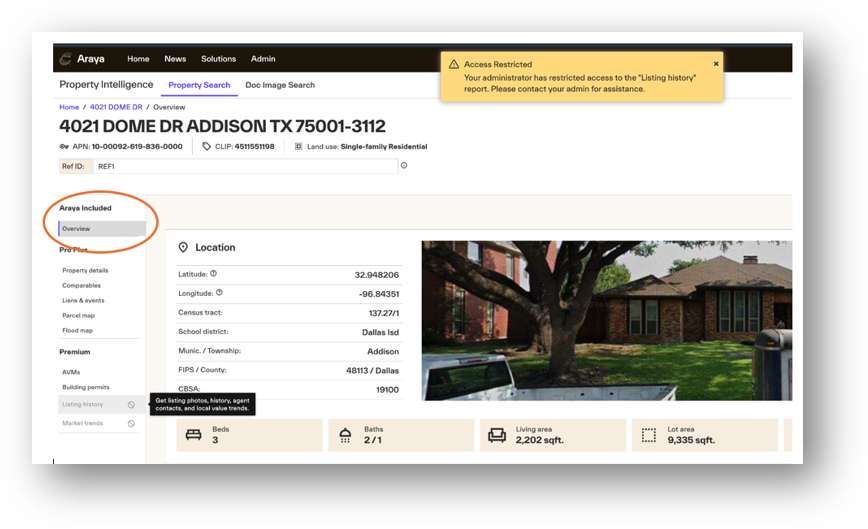
Feature access limits in Property Intelligence
When a feature is restricted, the report will be grayed out, and users who click it will receive an Access Restricted notification.
Default Settings: All core reports are ON by default including Property Details, Comparables, Liens & Events, Parcel Map, Flood Map, Building Permits, AVMs, and Doc Image search.
Important note: Access to Market Trends and Listing History are OFF by default. These require you to opt-in and are not available for users who are government-taxing authorities, appraisers, brokers, or real estate agents.
Configure Access: To set up customized geographic or feature-level access rules, Customer Admins can navigate to the Admin Center, Product Restrictions starting today.
Important note: Currently, the feature and geography access settings apply to all users. It is not possible to provide some users with access and to limit access for others at this time.
As always, we appreciate your feedback. Please contact your Customer Success Manager with any questions or click the "Still Need Help? Contact Us" button within Araya. Stay tuned for more updates!
Best regards,
The Araya Team